

AMD模块化规范
环境准备
第一步:准备文件结构:
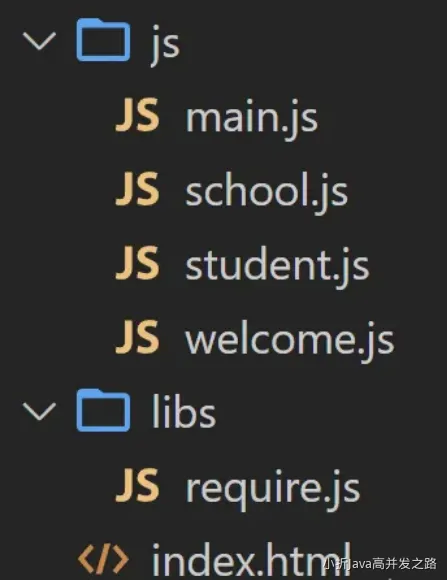
文件说明:
- js文件夹中存放业务逻辑代码,main.js用于汇总各模块。
- libs中存放的是第三方库,例如必须要用的require.js。
第二步:在index.html中配置main.js与require.js
html
<script data-main="./js/main.js" src="./libs/require.js"></script>第三步:在main.js中编写模块配置对象,注册所有模块。
js
/*AMD_require.js模块化的入口文件,要编写配置对象,并且有固定的写法*/
requirejs.config({
  //基本路径
  baseUrl: "./js",

  //模块标识名与模块路径映射
  paths: {
    school: "school",
    student: "student",
    welcome: "welcome",
  }
})导出数据
AMD规范使用define函数来定义模块和导出数据。
student.js
js
define(function(){
  const name = '张三'
  const motto = '走自己的路,让别人五路可走!'

  function getTel (){
    return '19986494173'
  }

  function getHobby(){
    return ['抽烟','喝酒','coding']
  }
  // 导出数据
  return {name,motto,getTel}
})导入数据
如需导入数据,则需要define传入两个参数,分别为:依赖项数组、回调函数。
school.js
js
// ['welcome']表示当前模块要依赖的模块名字
// 回调接收到的welcome是模块导出的数据

define(['welcome'],function(welcome){
  let name = {str:'折木'}
  const slogan = 'JS一把梭!'+ welcome

  function getTel (){
    return '19986494173'
  }

  function getCities(){
    return ['北京','上海','深圳','成都','武汉','西安']
  }
  // 导出数据
  return {name,slogan,getTel}
})使用模块
main.js
js
requirejs(['school','student'],function(school,student){
  console.log('main',school)
  console.log('main',student)
})